
Tempest Weather
WeatherFlowWeather
4.3327.00 Reviews
- Version
- v5.10.18
- Installs
- 100.00K
- Age Rating
- Everyone
Screenshots
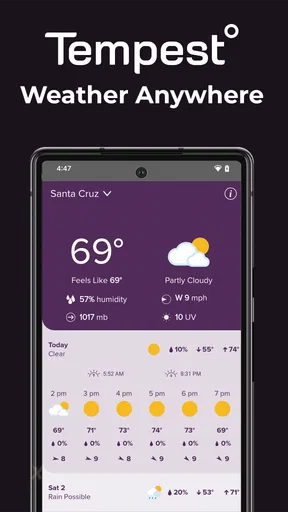
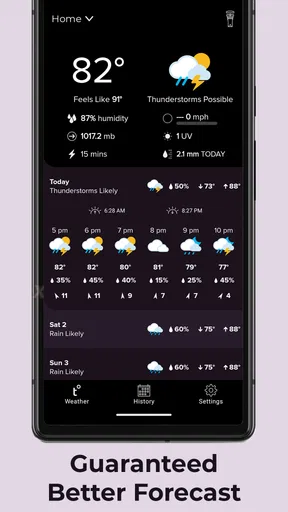
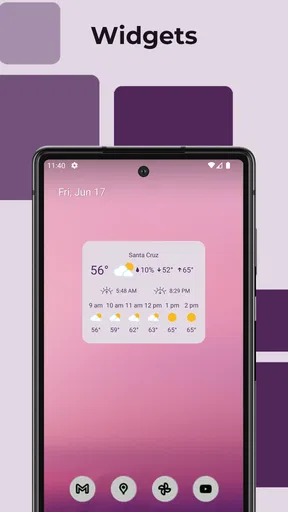
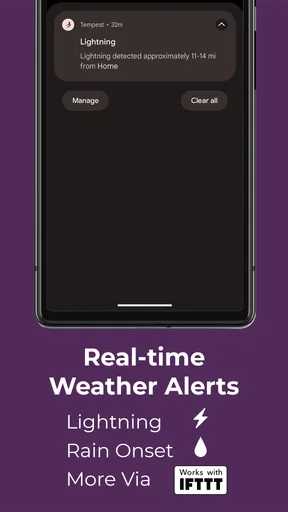
Our Review of Tempest Weather
 Analysis by Appyee
Weather apps usually ask me to trust a forecast generated for a broad area. Tempest Weather takes a more local approach, but with an important condition: it is designed to work with a Tempest sensor device. That distinction shapes the entire experience. This is not simply another app to open when I want a quick rain icon; it is the companion for people who want their own nearby weather station to influence what they see.
After using it as a weather companion, I found the main appeal easy to understand. The app brings readings from a personal Tempest setup into a mobile interface, making the information feel connected to the place where I actually live rather than to a distant reporting point. WeatherFlow, the developer, presents it as a free weather app for everyone, and its audience is clear: homeowners, gardeners, outdoor enthusiasts, and anyone who has a practical reason to watch conditions around one specific property.
The app has been available since October 6, 2017, and its current version is v5.10.18. It runs on Android 5.0 or later, so compatibility is broad on Android devices that are still in use. Its 4.3 average from around 699 ratings and more than 100K installs suggest that it has found a committed audience, although the relatively specialized hardware requirement matters more here than the download figure.
Why the personal sensor changes the forecast experience
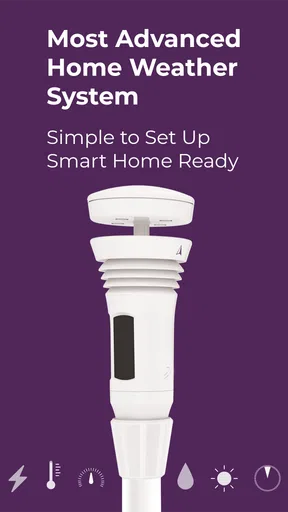
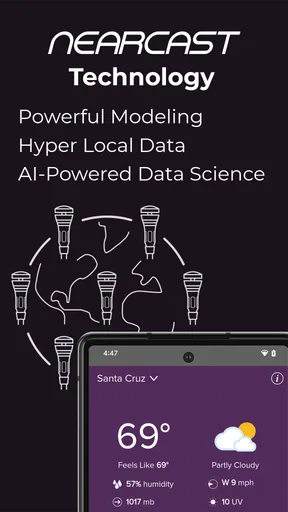
The most meaningful capability is the connection between the app and a Tempest sensor device. A conventional weather app can be perfectly useful for checking a city forecast, but city-level information can miss what is happening at your home. A shower may pass over one neighborhood while another stays dry, and wind can vary noticeably between an exposed yard and a sheltered street. A nearby sensor gives the app a more direct local reference.
In my experience, that changes how I use weather information. Instead of treating the forecast as a general prediction and then looking outside for confirmation, I can use the local readings as a second layer of context. The forecast tells me what may happen over the coming hours, while the sensor helps me understand what is happening at the property right now. That combination is more useful than either source on its own.
The distinction is especially valuable for decisions that depend on small changes in conditions. I might postpone painting outside if the local weather is becoming damp, delay watering if rain is approaching, or decide whether a walk needs a waterproof jacket. For these choices, a broad forecast can be a starting point, but the immediate conditions around my home are often the detail I really need.
The key benefit is not simply “more weather information”; it is weather information tied to one physical place. That makes the app less compelling for someone who only wants a forecast before commuting across town, but much more compelling for someone managing a garden, a yard, outdoor equipment, or regular activities at home.
What the app is, and what it is not
It is worth setting expectations before installing it. Tempest Weather is an app in the weather category, but its purpose is closely linked to Tempest hardware. If I do not own a compatible Tempest sensor device, the central reason to choose this app becomes much weaker. A standard weather app may be the better option for checking conditions in another city, planning a trip, or getting a quick forecast without setting up equipment.
That hardware connection is not a flaw; it is the product’s identity. Still, it means the app should be judged as part of a sensor-based weather system rather than as a stand-alone replacement for every weather service. The free price makes trying the app less of a financial commitment, but the overall experience depends on whether the accompanying device fits my needs and budget.
For someone who already has the sensor, the app is the natural mobile window into that setup. For someone browsing free weather apps, it may feel unusually specialized. I would not install it expecting a generic forecast tool and then wonder why the experience is centered on a personal station.
Using the local readings in everyday routines
The most practical workflow is simple. I open the app when I need to make a decision connected to my immediate surroundings, check the local conditions, and compare that information with the upcoming forecast. The value comes from repeating that process at the right moments rather than staring at the app throughout the day.
A realistic example is a weekend morning at home. I want to wash outdoor furniture and leave it outside to dry. A normal forecast may show a low chance of rain for the wider area, but the local sensor gives me a better sense of whether conditions at my property are already damp, windy, or changing. If the local situation looks unsettled, I can avoid doing the job twice. The app does not remove uncertainty, but it helps me make the decision with more relevant evidence.
Gardening is another strong use case. I can check conditions before watering rather than relying only on a forecast written for a larger region. That does not mean the app should replace judgment about soil, plant type, or shade. Instead, it adds a nearby weather reference to a routine that is otherwise based on guesswork. The small advantage becomes more noticeable when the garden is sensitive to repeated wet or dry periods.
Outdoor hobbies benefit in a similar way. If I spend time cycling, walking, photographing landscapes, or maintaining equipment outside, local conditions can influence comfort and safety. Wind near my home may not match a regional forecast, especially where buildings, trees, slopes, or open fields affect exposure. A personal sensor cannot predict every condition along a route, but it can help me decide when to leave and what to carry at the starting point.
A better way to combine immediate conditions and forecasts
I found it helpful to separate two questions: “What is happening here now?” and “What is likely to happen later?” The sensor-oriented side of the app is most useful for the first question. The forecast side is more useful for the second. Mixing those roles can lead to disappointment, because an accurate current reading is not the same thing as a guarantee about the next several hours.
For example, a dry local reading does not mean rain cannot arrive soon. Conversely, a brief shower at the sensor does not necessarily mean a full afternoon of bad weather. I use the current local information to adjust my immediate plan, then use the forecast to decide whether that plan makes sense over a longer period. This two-step habit is one of the app’s most useful lessons.
Another practical tip is to check the app at decision points rather than only at the start of the day. Conditions can change between breakfast and the time I leave for an activity. A quick second look before opening windows, mowing, hanging laundry, or starting outdoor work is more useful than assuming the morning check remains valid all day.
The app also makes more sense when I treat it as a property-focused tool. If I am traveling across town, visiting another area, or planning a route several hours away, I should not assume that readings from my home represent the destination. In those situations, a broader forecast service may deserve more attention.
Where the experience can feel less convenient
The requirement for a Tempest sensor is the first source of friction. A person who wants instant weather information on a phone may not want a device-based setup at home. Even though the app itself is free, the complete experience is not equivalent to downloading a free forecast app and using it immediately. The hardware requirement adds a decision, a setup step, and a permanent connection between the app and a physical location.
There is also a mental adjustment involved. Personal weather data can feel more precise because it comes from nearby, but “nearby” does not mean perfectly representative of every part of a property or every place I plan to visit. Sensor placement matters in the real world. A reading taken in a sheltered position may differ from what I experience in an exposed part of the yard. I therefore avoid treating one number as an absolute description of the entire neighborhood.
That is an important trade-off compared with a conventional weather app. A mainstream app is usually easier for general-purpose planning because it is designed around many locations and does not depend on my own equipment. Tempest Weather is more personal, but that specialization narrows its role. I gain local relevance at home and lose some of the simplicity and portability of a purely location-based app.
Another limitation is that local readings can encourage overconfidence. When information feels close to me, I may be tempted to assume it is automatically more useful in every situation. I still need to look at the wider forecast for changing conditions, travel, severe weather planning, or activities far from the sensor. The app works best when it complements broader information instead of trying to replace it.
How it compares with ordinary weather apps
The usual weather app wins on convenience. I can install one, allow it to use my location, and immediately check conditions in different places. That is ideal for commuting, travel, school runs, and spontaneous plans. It is also the better choice if I do not want to buy or maintain a personal sensor.
Tempest Weather wins when the question is highly local and tied to a fixed property. A regional forecast may be adequate for deciding whether to carry an umbrella downtown, but a sensor-based app is more interesting when I care about the exact conditions around my home, garden, workshop, or outdoor equipment. The difference is not that one category is always more accurate; the difference is that they answer different questions.
I would also compare it with a basic widget or notification-focused app. Those tools are excellent for glanceable information, but they can encourage me to consume weather as a simple symbol: sun, cloud, or rain. Tempest Weather is more valuable when I am willing to inspect local conditions and use them in a decision. If I only want a tiny forecast on the home screen, another app may be less demanding.
Who benefits most from the sensor-focused approach
The strongest audience is someone who spends a lot of time at one property and notices that local conditions affect daily tasks. Gardeners can use it as one input when deciding about watering or outdoor work. Homeowners can check conditions around the house before planning maintenance. People with regular outdoor hobbies can use local readings to make departure decisions. Anyone who has already invested in a Tempest sensor is likely to get the clearest value from the companion app.
It is also a good fit for users who enjoy observing weather rather than merely receiving a yes-or-no forecast. The app encourages a more informed relationship with conditions: look at what is happening nearby, compare it with what is expected, and make a practical choice. That approach suits me when I want context instead of a single simplified icon.
Families may find the local perspective useful too, especially when several people share responsibility for outdoor routines. One person can check the conditions before gardening, another can look before taking equipment outside, and everyone is referring to the same home location. The app’s Everyone content rating also makes it broadly suitable from an age-classification standpoint, though the usefulness still depends on having the associated sensor setup.
On the other hand, I would skip it if my weather needs are mostly mobile. Travelers, delivery workers, commuters, and people who regularly move between locations may gain more from an app built around location search and broad coverage. I would also skip it if I want a weather app that works independently from any home hardware. In that case, the specialized design becomes unnecessary complexity.
Questions I would consider before relying on it
If I am wondering whether the free app means the whole experience is free, I would separate the software from the hardware. The app itself is free, but its main purpose is to be used with a Tempest sensor device. That makes the ownership decision central. I would choose it because I want a personal weather setup, not merely because I saw a free download.
If I am asking whether it can replace my existing weather app, my answer is usually no. It can become the better tool for conditions at the sensor’s location, while the existing app may remain more convenient for travel, route planning, and other destinations. Keeping both roles separate is more sensible than forcing one app to handle every weather question.
If I am concerned about Android compatibility, the minimum requirement of Android 5.0 means the app supports a wide range of older Android devices. I would still consider the condition of the phone itself, because an old operating system may affect the broader experience even when the app meets the stated requirement.
If I want to know whether the app is worth learning, I would ask how often local weather changes my plans. If the answer is often, the sensor-based approach can repay the extra setup through better day-to-day decisions. If the answer is rarely, a conventional forecast app will probably be faster and more practical.
Finally, if I expect perfect certainty, I would lower that expectation. Local readings improve awareness of current conditions, but they do not eliminate changing weather or make a forecast infallible. The best results come from combining the app’s nearby information with common sense, the wider forecast, and the actual conditions I can observe.
My final take on Tempest Weather
Tempest Weather is a focused weather app rather than a universal one. Its defining strength is the way it connects mobile weather checking with a Tempest sensor device, giving home-based decisions a more local reference than a standard regional forecast usually provides. That capability has a real effect when I am watering plants, planning outdoor chores, or deciding whether conditions around the house are suitable for an activity.
I appreciate that the app’s purpose is clear. It does not need to pretend that every user has the same weather needs. The free app, broad Android compatibility, and Everyone age classification make access straightforward, while the 4.3 average shows that many users find the experience worthwhile. Still, the hardware dependency means it is not the obvious choice for someone seeking a simple, location-based forecast.
My recommendation is therefore specific. If you own a Tempest sensor or are seriously considering a personal weather station, this is the companion I would try first because it gives that local setup a practical role in everyday decisions. If you only need forecasts for changing destinations, a conventional weather app will be easier. For a fixed home location, though, Tempest Weather turns weather checking from a generic glance into a more grounded part of daily planning.
Verdict
Strengths of Tempest Weather
- Clear forecasts with hourly and daily weather details.
- Useful radar and alert features help track changing conditions.
- Clean interface makes key information easy to find.
- Supports multiple locations for travel and planning.
- Weather updates are generally quick and reliable.
Limitations of Tempest Weather
- Some advanced features may require a paid subscription.
- Advertising can reduce the uncluttered feel for free users.
- Forecast accuracy may vary by location and local data coverage.
- The app may use noticeable battery when location tracking is enabled.
- Some settings and information can feel overwhelming for new users.
Other Releases by WeatherFlow
View All
WindAlert: Wind & Weather Map
Weather4.7

SailFlow: Marine Forecasts
Weather4.8

FishWeather: Marine Forecasts
Weather4.8

iKitesurf: Weather & Waves
Weather4.8
Similar Picks in This Category
View All
Weather - By Xiaomi
Xiaomi Inc.4.1

Weather & Radar Forecast
WetterOnline4.8

Weather
OneLouder Apps4.6

AccuWeather: Weather Radar
AccuWeather3.6

The Weather Channel - Radar
The Weather Channel4.6

1Weather Forecasts & Radar
OneLouder Apps4.3
Frequently Asked Questions
What is Tempest Weather, and what does it offer?
Tempest Weather is a weather app designed to provide current conditions, forecasts, radar information, alerts, and weather-related details in one place. Its usefulness depends on the available data sources and the location selected. Before downloading, users should check whether the app supports their country, preferred measurement units, local forecasting coverage, and the specific features they expect, such as hourly forecasts or severe-weather notifications.
Does Tempest Weather require a Tempest weather station or other hardware?
Some Tempest Weather features may be most useful when connected to a compatible Tempest personal weather station, while other functions can provide general weather information without additional equipment. Users should review the app’s current requirements and supported devices before installing it. If you do not own Tempest hardware, confirm which forecasts, maps, alerts, and location-based tools remain available with the standard app experience.
How accurate are the forecasts and weather readings in Tempest Weather?
Forecast accuracy can vary according to your location, local terrain, weather conditions, and the data source being used. A connected personal weather station may provide highly localized observations, but it cannot guarantee perfect predictions. During rapidly changing or dangerous weather, compare information with official meteorological services and local emergency alerts rather than relying on one app alone.
Does Tempest Weather use my location or collect personal data?
Tempest Weather may request location access to show local conditions, forecasts, alerts, and nearby weather-station information. You can usually manage location permissions through Android or iOS settings, although limiting access may reduce convenience or accuracy. Before downloading, review the app-store privacy section and the developer’s privacy policy to understand what information is collected, how it is used, and whether data is shared with service providers.
Is Tempest Weather free to download, and are there in-app purchases?
The download model, available features, subscriptions, and hardware-related services can change over time and may differ between Android and iOS. Some basic weather functions may be available without payment, while advanced tools or connected-station services could require compatible equipment or optional purchases. Check the current store listing for the exact price, subscription terms, supported devices, and cancellation details before installing.
